Global POS Products in the Backoffice
Last updated: May 9, 2026
To view POS Products in Venue Sumo Backoffice go to Operations > POS Products
POS Products in the Backoffice are now global, meaning they can be controlled across multiple locations from the one area. This allows multi-location businesses to be able to easily maintain consistency in pricing, taxation and financial tracking while also enabling location-specific overrides for certain financial settings.
Location-Based Overrides
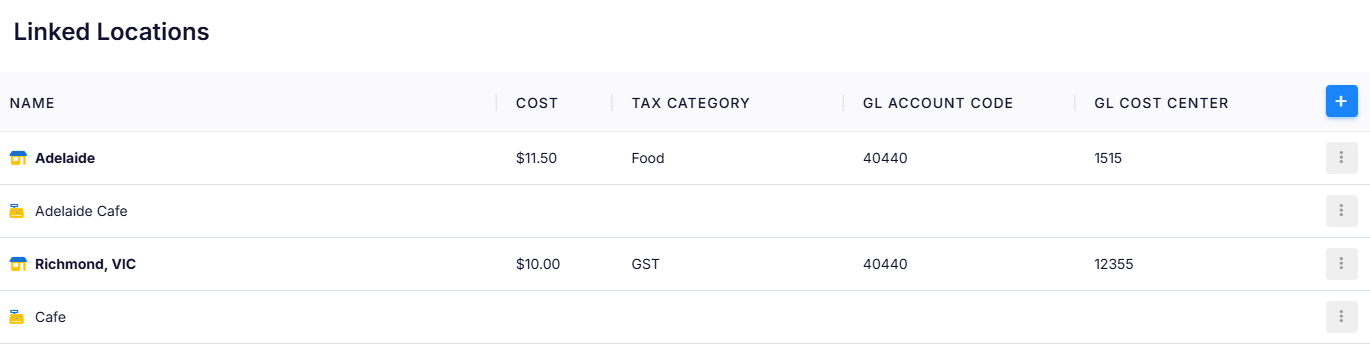
While most POS Product settings remain consistent across locations, businesses can override the following fields at specific locations:
Cost – Adjusts pricing for a particular location.
Tax Category – Change the Tax Category for that location (helpful for where taxes are different between state locations).
GL Account Code – Allows financial tracking per location.
GL Cost Center – Assigns costs appropriately for better accounting control.
POS Product Fields
Each POS Product contains various fields that can be configured to manage its details, cost, tax, and categorization.
Product Details
Name – The name of the product (e.g., $20 Gift Voucher).
Priority – Determines the priority display order of the product (default: 0).
Type – Defines the type of product (e.g., Merchandise, Food, Beverage or Coffee).
Printer Group – Specifies the printer group (e.g., No Print, Counter, Kitchen etc).
Stop Sell – Indicates if the product should no longer be sold (Yes/No).
Admin/POS Only – Restricts the product to admin or POS users (Yes/No).
Allow Decimals – Enables decimal-based quantity at the POS(Yes/No).
Allow Price Change – Determines if the price can be modified at the POS (Yes/No).
Warning Message – A custom alert message for staff when selling this product that displays in the POS.
Description – A brief explanation or details about the product.
Extra Info – Additional notes or information related to the product.
Costs & Taxes
Cost – The base cost of the product (e.g., 20.00).
Tax Category – The tax classification applied to the product (e.g., GST).
GL Account Code – The general ledger account assigned to the product.
GL Cost Center – The cost center associated with the product for accounting purposes.
Stock Management
Stock Item – Specifies whether the product is a stock-tracked item and which stock-item it is linked to.
Recipe Card – Links a recipe card if applicable (useful for food & beverage items).
Categorisation & Tags
Category – The primary product category assigned to the product (e.g., Drinks).
Sub Category – Further classification under the main category.
Report Category – The category used for reporting and analytics.
Tags – Custom tags that can be applied for filtering or search purposes.
Dietaries – Identifies dietary-related information (useful for food items).
Highlights – Allows marking special attributes or features of the product.