How customer profiles are created and linked (email, minors and secondaries)
Last updated: October 29, 2026
This article explains how VenueSumo creates customer profiles, why a customer can appear under different names but still have one profile, and how minors and secondaries are added and linked to an adult.
The short version
A customer's email address is their unique identifier.
A profile is created the first time an email is used on a purchase or a signed waiver.
Later orders and waivers using the same email attach to that existing profile.
Minors and secondaries don't need an email. They get their own profile, labelled by date of birth, and are linked to an adult.
Profile creation flow
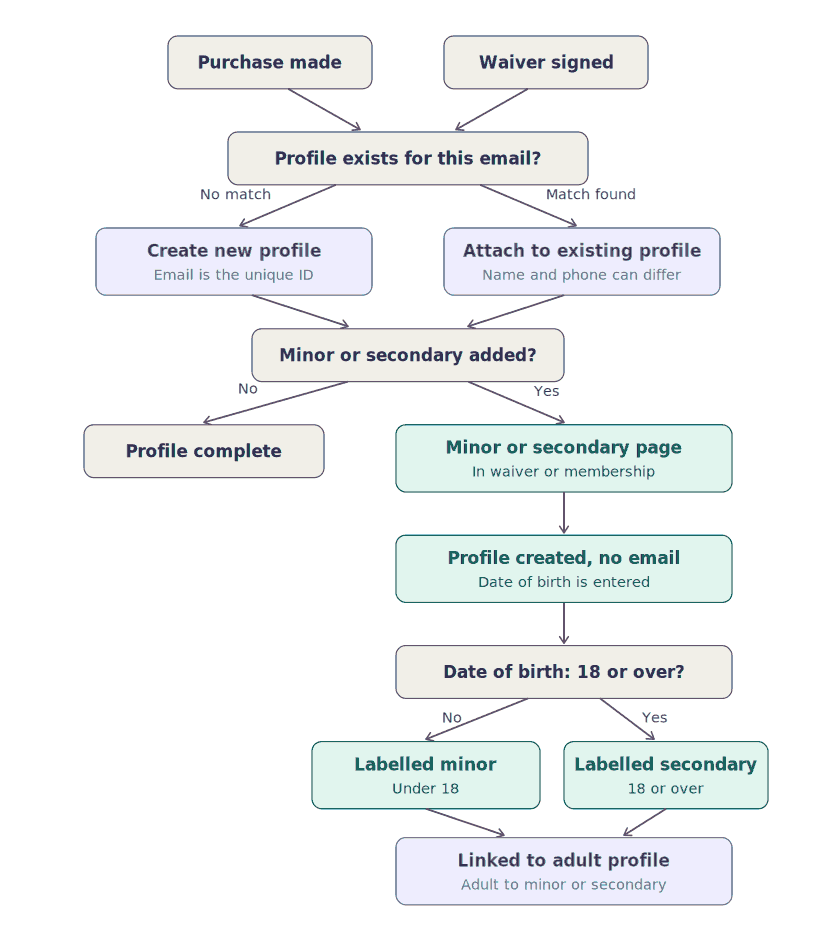
How profiles are created from an email
A profile is created when someone makes a purchase or signs a waiver. VenueSumo checks the email entered:
Situation | What happens |
|---|---|
No profile exists for the email | A new profile is created |
A profile already exists for the email | The order or waiver is attached to that profile |
Name and phone number don't affect matching. If a customer books under a different name or phone number but uses the same email, the order still attaches to their existing profile. Only the email is used to match.
Note: because matching is by email, a typo or a different email address will create a separate profile. If you see two profiles for one person, check whether they used different emails.
Adding minors and secondaries
Adults can be linked to minors, and to secondaries.
Examples of when this could happen:
During the waiver process - When adding the details on the second page
When creating a membership
A profile is still created for the person, but it is labelled as a minor or secondary and linked to the adult.
How the label is chosen
The label is based on the date of birth entered when the waiver or membership is created:
Date of birth | Label |
|---|---|
Under 18 | Minor |
18 or over | Secondary |
Summary of how it all fits together
A purchase is made or a waiver is signed with an email.
VenueSumo creates a profile for that email, or attaches to the existing one.
If the waiver or membership includes a minor or secondary, they are added on the minor/secondary page with a date of birth (no email needed).
Their profile is created, labelled minor or secondary by age, and linked to the adult.
Common questions
Why does one customer show different names on their orders?
Orders attach by email, not name. If they used the same email, they share one profile even when the name or phone number differed.
Why is there a duplicate profile for the same person?
They most likely used a different email address, or there was a typo in the email.
Can I add a child who doesn't have an email address?
Yes. Add them on the minor/secondary page. No email is needed.
Why was someone labelled a secondary instead of a minor?
The label comes from the date of birth. Anyone 18 or over is a secondary.